

Video by ZacCoxTV on YouTube. All credit to the creator; watch it on YouTube to like and subscribe.
GTA 6 launched without a first person camera option, but a first person glitch puts the camera behind the character's eyes anyway. Oneboyler found it and his clip passed half a million views in under a day; ZacCoxTV then posted the exact button steps.
Quick answer: Make a manual save, set the touchpad camera setting to option 2, get in a vehicle, then open the phone, close it and press the touchpad. Repeat about three times.
On Xbox, ZacCoxTV says you press the back (View) button instead of the touchpad.
The only way back to the normal camera is loading an older save, so save first.
Warning: This is a glitch, not a feature. Rockstar can patch it at any time, and it may already be gone on your version. Since you can only exit by reloading a save, you can lose progress since that save. Always make a fresh manual save before you try it.
How to do the first person glitch
These steps are from ZacCoxTV's video and description. He credits Oneboyler as the person who found it.
- Make a manual save. ZacCoxTV stresses this, because reloading an older save is the only way out.
- Open the pause menu, go to Settings and then the camera options.
- Change the touchpad camera setting from 1 to 2 (his description calls it going from 1/2 to 2/2).
- Get into any vehicle.
- Open your in-game phone, close it, then press the touchpad.
- Repeat that phone, close, touchpad sequence. ZacCoxTV says about three times does it.
- The view should switch to first person. ZacCoxTV says it carries over when you leave the vehicle, so you can walk around and even rob stores in it.
What works in first person
ZacCoxTV says you can drive, walk and even rob stores in first person. He thinks the first person animations are already in the game and Rockstar simply did not switch the option on. That is his reading, not something Rockstar has said.
Tips
- Do it in free roam, not during a mission, so a reload costs you as little as possible.
- If it does not switch after three tries, check that the touchpad setting really saved as option 2 and try again in a different vehicle. That is our suggestion, not from the videos.
- Oneboyler's original clip has no voiceover; it is gameplay only, so watch ZacCoxTV's video for the steps.
- More hidden mechanics are in our hidden features roundup, and the cheats page covers the codes found so far.
More videos
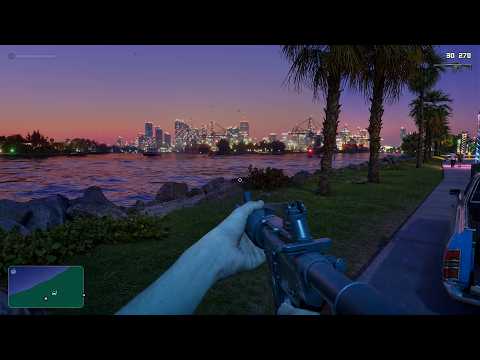
Oneboyler's original find: several minutes of driving and walking around Leonida in first person.
FAQ
Not as a setting at launch. Players reach it through this glitch only.
Set the touchpad camera option to 2, get in a vehicle, then open the phone, close it and press the touchpad about three times, per ZacCoxTV.
ZacCoxTV says yes: use the back (View) button in place of the touchpad.
Load a save from before you did the glitch. ZacCoxTV says that is the only way out.
Not that we know of as of November 20, 2026, but glitches can be removed in any update.


